
Key Takeaways
- Start with one useful task: ask about the page on screen or prepare a message without leaving your work.
- Use Agent Mode for questions and connected app actions; use Dictation when you want your spoken words typed into an input field.
- You do not need code or your own API keys. Install VoiceOS, complete the permission prompts, and connect the apps you want to use.
- Choose a voice in Agent settings, including Jarvis, and use your configured shortcut to speak.
- The examples below show real Mac screenshots. Slack works on Mac and Windows; Finder and Apple Reminders are Mac integrations. Review drafts and previews before confirming.
What your own Jarvis can do
Pick a task you already do every day. Each example pairs a request with the actual VoiceOS interface, so you can see what happens next. These screenshots show the Mac app; the requests below are examples you can adapt.
Mac & Windows
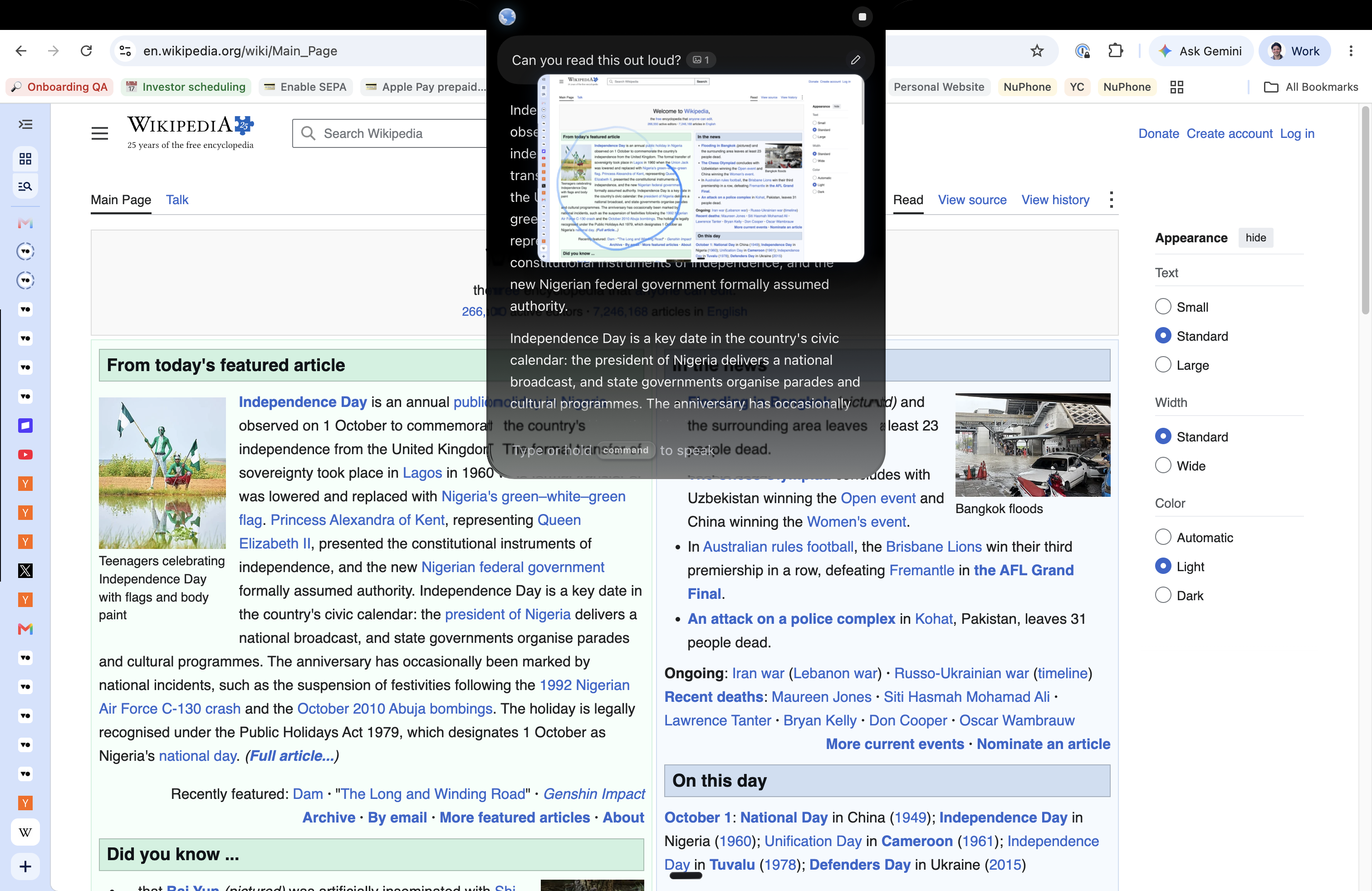
Listen to the page in front of you
Open an article, email, or document. In Agent Mode, include the visible page as screen context and ask VoiceOS to read it aloud. Enable spoken replies to listen. You can follow up with “What is the main point?” without pasting the text into a separate chat.
“Read this page out loud.”
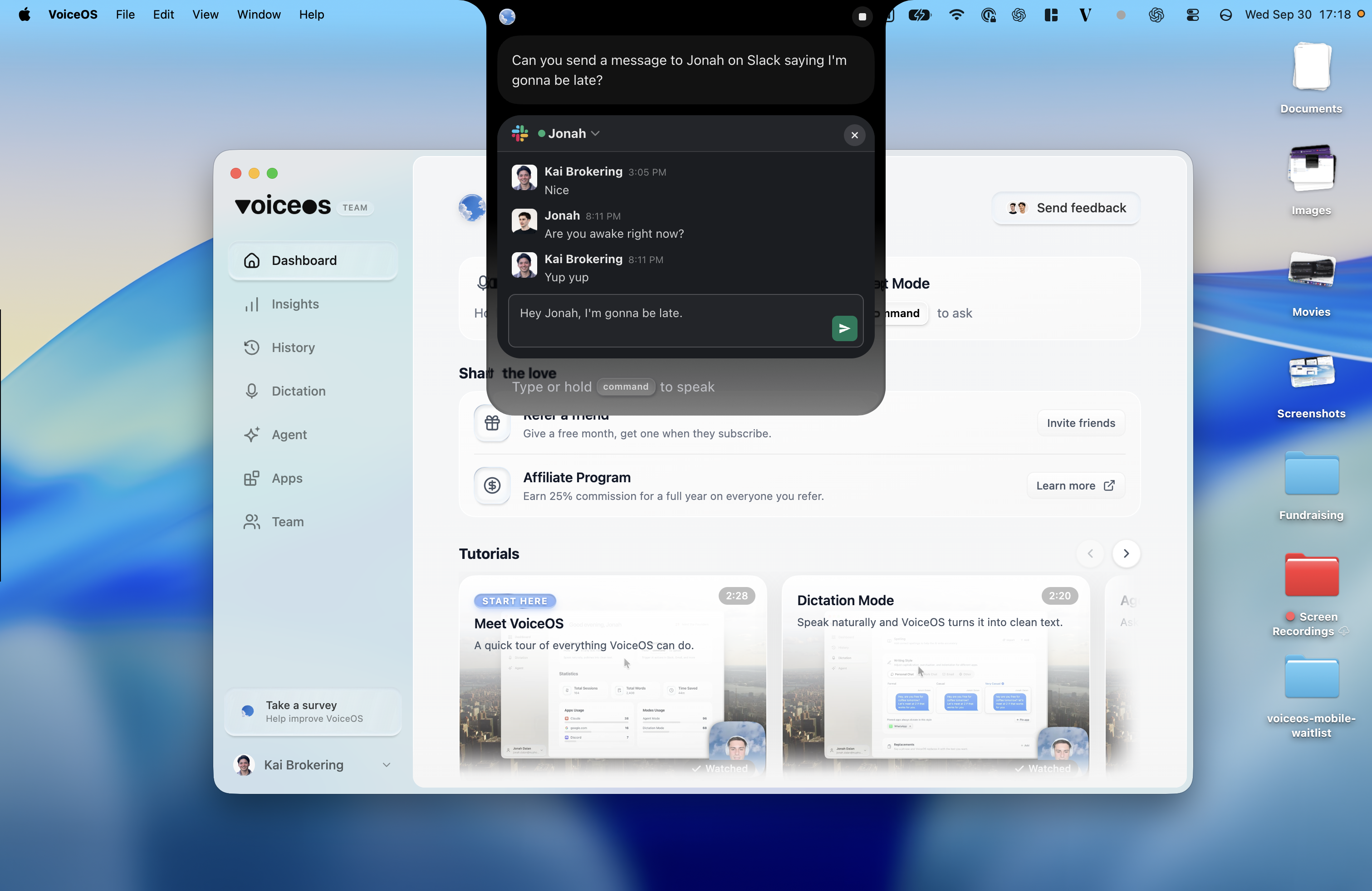
Mac & Windows · Slack connection
Prepare a Slack reply while you keep working
Connect Slack, then say who the message is for and what you want to say. VoiceOS prepares a draft with the recipient and message together. Check it, make any changes, and send when you are ready.
“Tell Jonah on Slack that I’m going to be late.”
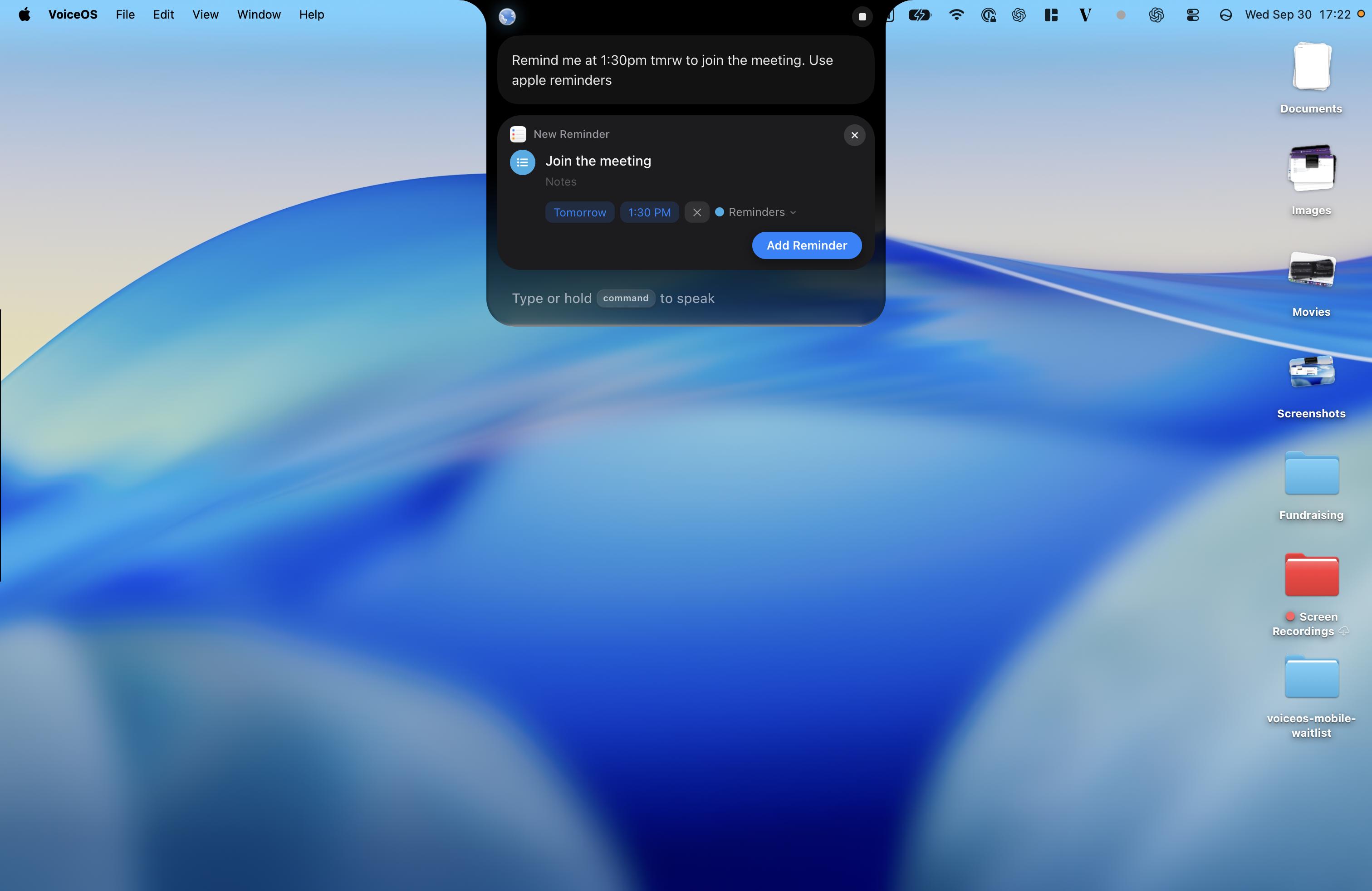
Mac · Apple Reminders
Turn “I need to remember” into a reminder
Say the task and the time together. The reminder preview lets you check the title, date, and time in one place. Confirm it when those details are right, then return to what you were doing.
“Remind me tomorrow at 1:30 pm to join the meeting.”
Mac · Finder
Find a file without remembering its folder
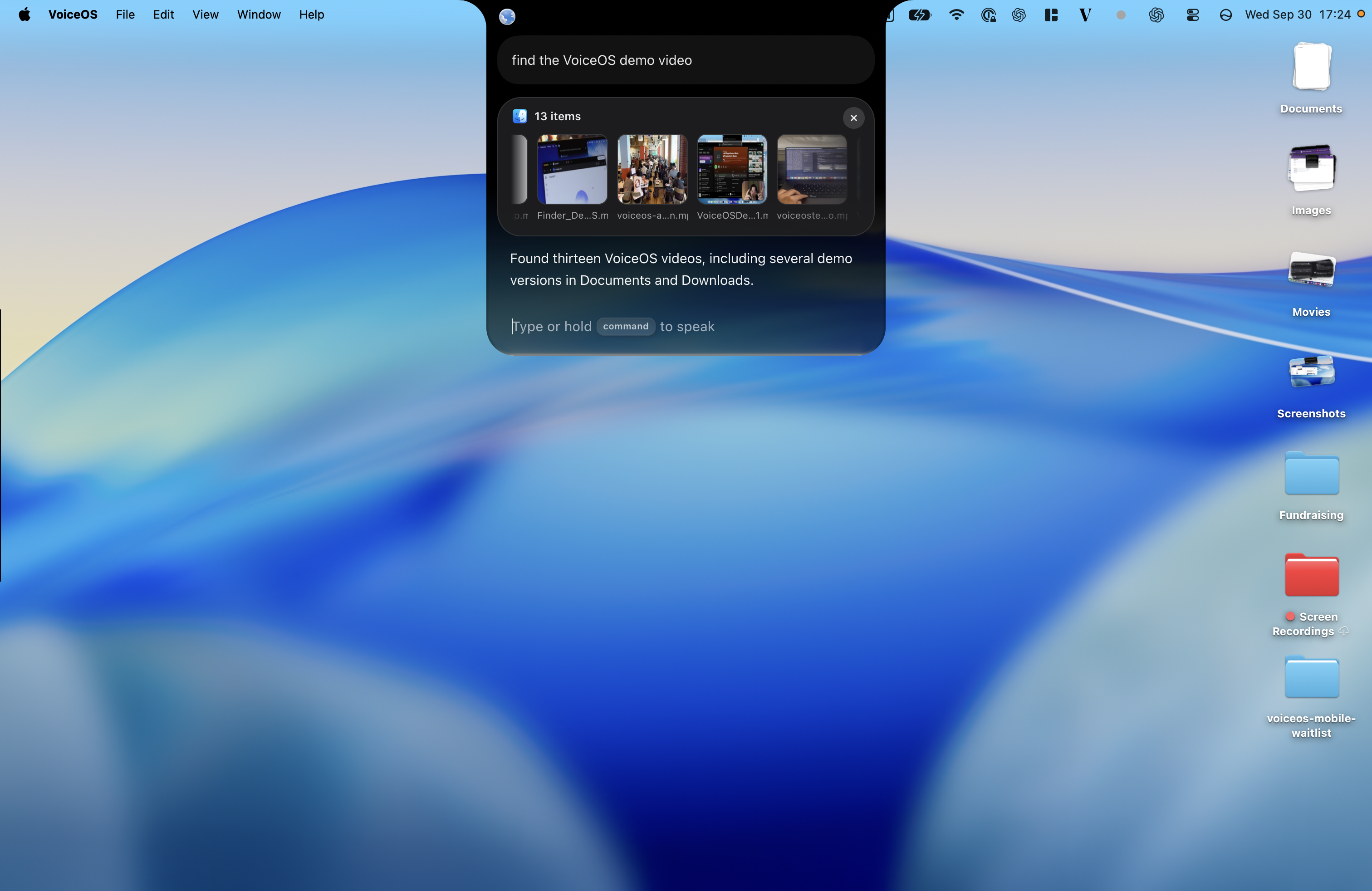
Describe the file you need instead of opening folders one by one. In this example, VoiceOS returns matching videos from Documents and Downloads. Inspect the results to choose the right version.
“Find the VoiceOS demo video.”
Make it yours by connecting the apps you use most. You can also prepare a shopping list in Apple Notes on Mac, or draft a Linear issue from screen context on Mac and Windows.
Start with one task you want off your hands
Install VoiceOS, then try reading a page aloud or preparing your next reply.
How to start talking to your computer
You do not need to build an assistant from scratch. Set up VoiceOS around the apps and tasks that matter to you.
Install VoiceOS and complete onboarding
Download the app for your computer, sign in, and follow its permission prompts. Enable microphone access; screen questions also need screen access.
Connect one app you already use
Open Apps in VoiceOS and connect Slack, for example. Approve the permissions for the integration you choose. Start with one connection, then add more when you need them.
Choose how your assistant sounds
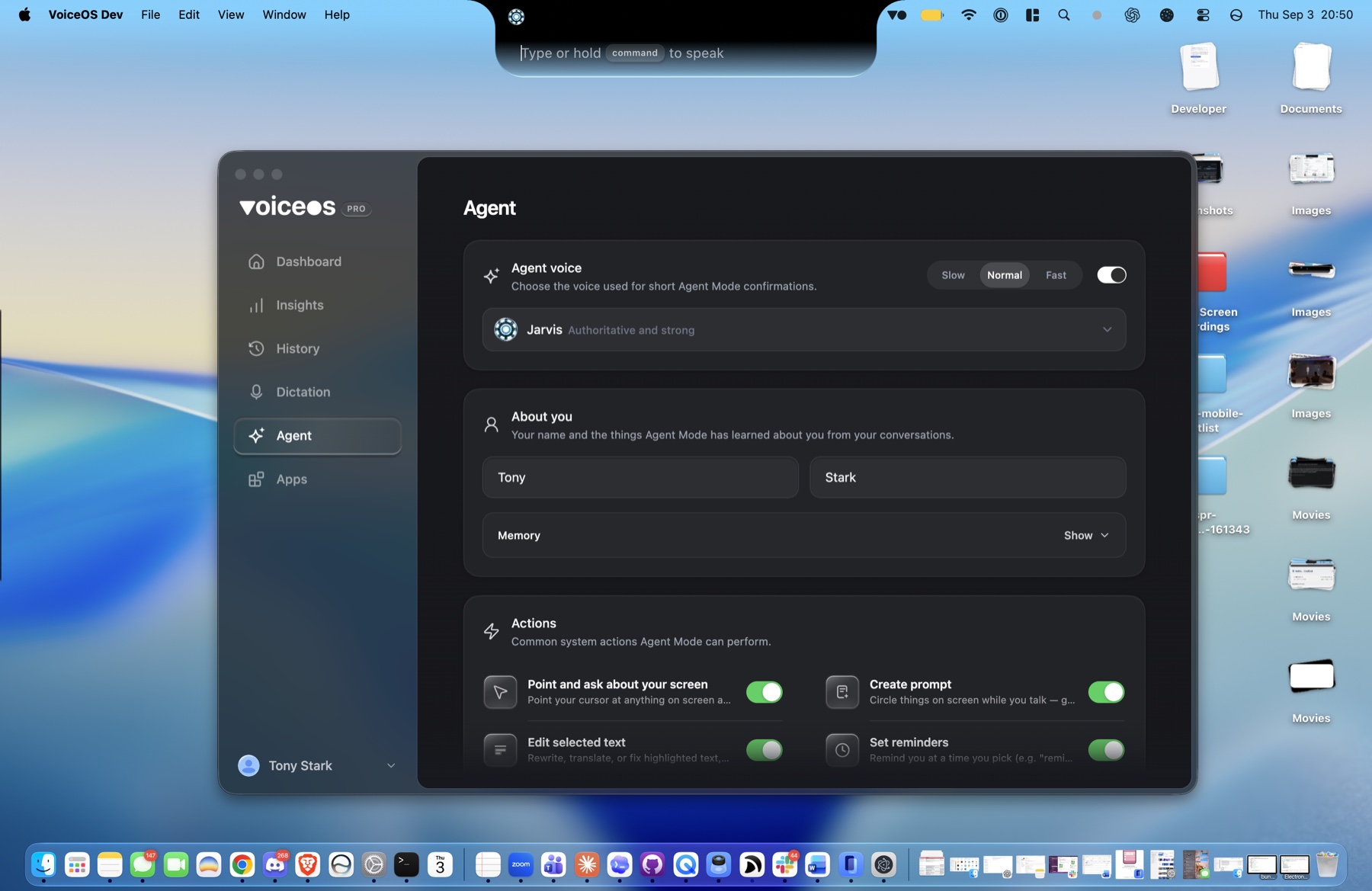
Open Agent settings and choose an Agent voice. The screenshot below shows Jarvis selected. Enable spoken replies if you want to hear the assistant answer.
Try one request with your shortcut
Use the Agent shortcut shown in your settings. Ask it to read the page in front of you, or prepare a Slack message. Review the result before confirming an action.
Your first request
Open a page you want to read and ask: “Read this out loud.” Next, try: “Summarize the main points.”
"Jarvis, wake up, Daddy's home"
"Jarvis, wake up, Daddy's home."
Tony Stark, Iron Man
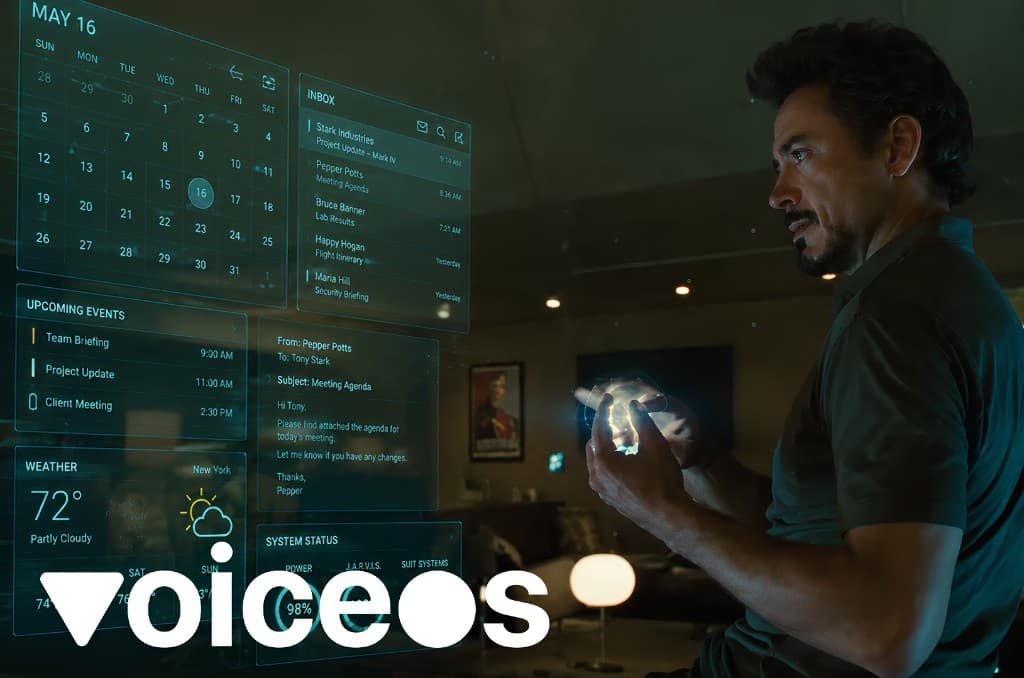
There is a moment in Iron Man that stuck with almost everyone who saw it. Tony Stark walks into his workshop, the lights come on, and he casually says, "Jarvis, wake up, Daddy's home." A calm voice answers, the screens light up, and the most advanced computer in the world is suddenly listening, understanding, and ready to help.
It was a throwaway line in a superhero movie. But it landed because it showed something we instinctively want from our machines. No keyboard. No mouse. No menus. Just a person who walks in, speaks naturally, and a computer that understands and acts. Jarvis was not a gadget. Jarvis was a relationship with your computer.
For most of us, that scene felt like pure science fiction. Our real computers needed us to click, type, drag, copy, paste, switch windows, and repeat. The gap between "Jarvis, wake up" and "open the document, find the line, change the wording, attach it, send it" was enormous. That gap is exactly what has finally closed.
Why that scene captured the future of computing
The Jarvis fantasy was never really about robotics or holograms. It was about the interface. Stark did not operate his computer one step at a time. He directed it. He spoke goals, asked questions, and the system filled in the steps. That is a fundamentally different relationship than the one we have had with software for forty years.
Every major leap in computing has been about getting closer to human intent. The command line let us type instructions. The graphical interface let us point and click instead of memorizing commands. Touch let us use our fingers directly. Each step removed friction between what a person wanted and what the machine did. Voice is the natural next step, because talking is the most human interface of all.
That is why the Jarvis scene resonated. It showed the end state of that progression: an interface so natural you forget it is an interface. You just talk, and the computer keeps up. The reason it stayed fictional for so long was not the microphone. It was the intelligence behind it.
What had to change: from commands to intent
Voice control is not new. Dictation software, Apple Voice Control, Windows Voice Access, and assistants like Siri and Alexa have existed for years. But older systems mostly recognized words and mapped them to fixed commands. You had to know the exact phrase. You had to speak the steps. If you said something messy or human, it broke.
That is the difference between recognizing speech and understanding intent. Jarvis was never impressive because it could hear Tony. It was impressive because it understood him. When he described a goal, it knew what he meant, figured out the steps, and did the work. Old voice control could hear you. It could not think with you.
AI is what closed that gap. Modern language models understand context, tone, and intent. They can take a vague, natural request and turn it into a concrete plan. "Find Sarah's last message, tell her Thursday works, and put it on my calendar" is no longer too messy to handle. The computer can parse the goal, pick the right apps, draft the right text, and prepare the action. That is the leap from voice command to voice agent.
The future is arriving now
Everything needed to make Jarvis real has quietly arrived at the same time. Speech recognition is fast and accurate. Language models understand intent. Computers can connect to your apps and take actions through them. Put those together and the science fiction interface becomes an ordinary piece of software you can install today.
You can see the whole industry leaning into it. Big tech is racing to put AI voice assistants on phones and desktops, cars now respond to natural conversation, and developers are starting to build software by talking to it instead of typing. The direction is clear. The keyboard is no longer the only way in. Voice is becoming a primary way to operate a computer, not just a novelty.
The point is that this is no longer something you wait for. The future the movie promised is not a far-off product roadmap. It is here, it works, and you can start using it the same way Tony did: by talking to your computer and expecting it to understand.
Meet your real-life Jarvis: VoiceOS
VoiceOS is the practical version of that scene. It runs system-wide on Mac and Windows, so your voice is not trapped inside one app. Whether you are in Gmail, Slack, Notion, a browser, a code editor, or a document, the same voice layer is there. You press your trigger, speak naturally, and VoiceOS turns your words into the right kind of output.
You do not need a holographic lab, code, or your own API keys. Install VoiceOS, complete onboarding and the permission prompts, then connect the apps you want your assistant to use.
Under the hood it needs four things, and it has all of them: a microphone you can summon instantly, AI that understands natural language, access to the apps where your work actually happens, and a confirmation loop so you stay in control before anything important is sent. That is Jarvis, minus the fiction.
The shift it creates is the same one that made the Iron Man scene feel magical. You stop operating your computer one tiny click at a time and start directing it. You describe the outcome you want, and the machine handles the manual glue work in between. The dream was never about replacing your judgment. It was about removing the busywork between your intent and the result.
A Jarvis that lives on your computer and knows your world
VoiceOS lives right in the notch on Mac, and in the same always-available spot on Windows. It is not an app you open and close. It sits at the top of your screen, one word or one tap away, ready the moment you need it. You do not go looking for it. It is already there, all day, every day.
What makes it feel like Jarvis is not just that it listens. It is that it knows you. VoiceOS can hold context about you and your day: how you like to write, the people you talk to most, and what you are working on. Over time it stops feeling like a tool you operate and starts feeling like an assistant that already understands what you mean before you finish explaining.
It also has access to the context of your life, with your permission. Connect your email, your Google Calendar, Slack, and the apps where your work and your life actually happen, and VoiceOS can reason across all of them. It can see that a meeting moved, that an email is waiting for a reply, or that your afternoon is overbooked, and help you handle it without digging through five different windows yourself.
That combination, always present, aware of you, and connected to your world, is exactly what made the fictional Jarvis feel alive. Jarvis was never a search box you visited. It was a presence that lived alongside Tony Stark and knew his context. VoiceOS brings that same presence to your everyday Mac or Windows computer.
For the first time, you control your software, not the other way around
Think about how most software is designed today. Feeds are built to keep you scrolling. Notifications are tuned to pull you back in. Apps compete for your attention and quietly decide what you see and when. For years the relationship has run in one direction: the software shapes your behavior, and you adapt to it.
A Jarvis-style assistant flips that relationship. Instead of you serving the software, the software serves you. You speak what you want, and your computer arranges itself around your intent. You are no longer clicking through interfaces that were designed to keep you engaged. You are giving instructions and getting outcomes.
That is a genuinely new relationship with computing. For arguably the first time, you can sit at your machine and stay in command of it instead of being pulled around by it. You decide what happens, the assistant does the legwork, and the dozens of little tasks that used to drag you into apps get handled by voice while you stay focused.
Concretely, that looks like ordinary moments throughout your day. "Play my focus playlist on Spotify." "Open my email and my notes." "Move my 3pm to tomorrow morning." "Reply to Maria that the briefing looks good." You stay in your seat, hands free, and the work happens. It is a voice assistant living on your computer that you simply talk to, the way Tony talks to Jarvis.
What you can actually do with voice
Dictate mode turns natural speech into polished text anywhere your cursor is. You can ramble, pause, and correct yourself, and VoiceOS removes filler words, fixes grammar, adds punctuation, and matches the tone of the app. A Slack reply stays casual. An email sounds professional. A prompt to an AI tool comes out clean.
Edit mode lets you reshape existing text by talking. Instead of highlighting and rewriting by hand, you can say "make this shorter," "turn this into bullet points," or "make it friendlier," and watch it change. Agent mode lets you question what is on your screen. Looking at a document, dashboard, or email thread, you can ask for a summary, an explanation, or a draft response in place.
Agent mode is also where voice becomes action, and it is the part that feels most like Jarvis. You can ask VoiceOS to work across connected services like Gmail, Slack, and Google Calendar. "Reply to that Slack message saying I can review it after lunch," "create a calendar event for tomorrow at 2," or "draft an email to the team with the summary from this page." VoiceOS prepares the action and confirms before completing anything important, so you direct the work and stay in command.
Frequently Asked Questions (FAQ)
Is there a real-life Jarvis like in Iron Man?
Yes. In 2026 you can get a real-life Jarvis for your computer, and VoiceOS is one of the easiest ways to do it. It lets you talk to your Mac or Windows computer in plain language and have it respond, answer questions about your screen, and take actions across your apps. It is the everyday version of the assistant Tony Stark talks to in Iron Man.
How can I get a Jarvis-like AI assistant for my computer?
Install VoiceOS on Mac or Windows, complete onboarding and the permission prompts, then use the Agent shortcut shown in your settings. Start with a question about the screen, or connect an app such as Slack to prepare a message. You do not need to write code or memorize commands.
Can AI actually control my computer with my voice?
Yes. Modern AI understands intent, not just fixed commands, so you can describe what you want in natural language and have it carried out. With VoiceOS you can speak an outcome like "reply to this email" or "summarize my screen," and it turns that into action, asking for confirmation before anything important happens.
What is the best app to get a real-life Jarvis and control your computer by voice in 2026?
VoiceOS is one option for a Jarvis-style assistant on Mac and Windows. It combines dictation, editing, screen questions, and connected app actions. You do not need your own API keys; complete the permission prompts and connect the apps you want to use.
Do I need to be a developer or set up API keys to use a real-life Jarvis?
No coding or personal API keys are required to use VoiceOS. Install the app, sign in, follow the permission prompts, and connect the integrations you need. Building a custom integration is optional.
What is the quote "Jarvis, wake up, Daddy's home" from?
It is a line Tony Stark says to his AI assistant Jarvis in the Iron Man films when he walks into his workshop and the system comes to life. It became a cultural shorthand for the dream of talking naturally to your computer and having it understand and respond, which is exactly the experience VoiceOS now makes real.
What can VoiceOS actually do when I talk to it?
With VoiceOS you can dictate text into any app, rewrite and reshape existing text, ask questions about what is on your screen, draft emails, prepare Slack messages, create calendar events, search for information, and chain several steps together by voice. The exact actions depend on your connected apps, but the core experience is consistent: speak the outcome and let VoiceOS help execute it.
Wake up your own Jarvis
Choose a voice, connect the apps you use, and try your first request.