
Key Takeaways
- Tesla rolled out xAI's Grok into its vehicles starting July 12, 2025 (software 2025.26), added conversational navigation in the December 2025 Holiday Update (2025.44, Grok 4.1 Fast), and shipped the 'Hey Grok' hands-free wake word with the Spring 2026 update (2026.14).
- In the car today, Grok can answer open-ended questions, hold long conversations, plan and edit multi-stop navigation by voice, set location-based reminders, look up information, and run different personalities like Storyteller, Assistant, Meditation, and Unhinged. It does not yet control climate, media, or seats.
- Hands-free voice is the most seamless interface ever shipped to consumers because it demands nothing from the user's hands or eyes, makes real multitasking possible, and collapses the chain from thought to finished action into a single spoken intent.
- The same loop that works on the dashboard is the future of the desktop. VoiceOS brings hands-free, multi-step voice control to Mac and Windows across every app you already use. Backed by Y Combinator (Spring 2025).
What Tesla shipped: Grok inside every new car
On July 12, 2025, Tesla started rolling out Grok, an in-car conversational AI built by xAI, to its vehicles through software update 2025.26. Every Tesla delivered on or after that date arrived with Grok available out of the box, and existing Model S, Model 3, Model X, Model Y, and Cybertruck owners on the AMD infotainment processor received it over the air. There was no separate Grok subscription, no extra account required to start talking, and no app to install. The voice assistant simply appeared inside the car the next time the software updated.
At launch, Grok worked through the App Launcher or a long press on the steering wheel voice button. You needed Premium Connectivity or Wi-Fi, picked a voice and a personality, and started a conversation. The first version was deliberately conversational rather than operational. It could answer questions, talk through ideas, and entertain passengers, but it did not yet control the car. Existing voice commands for climate, media, and navigation remained completely separate.
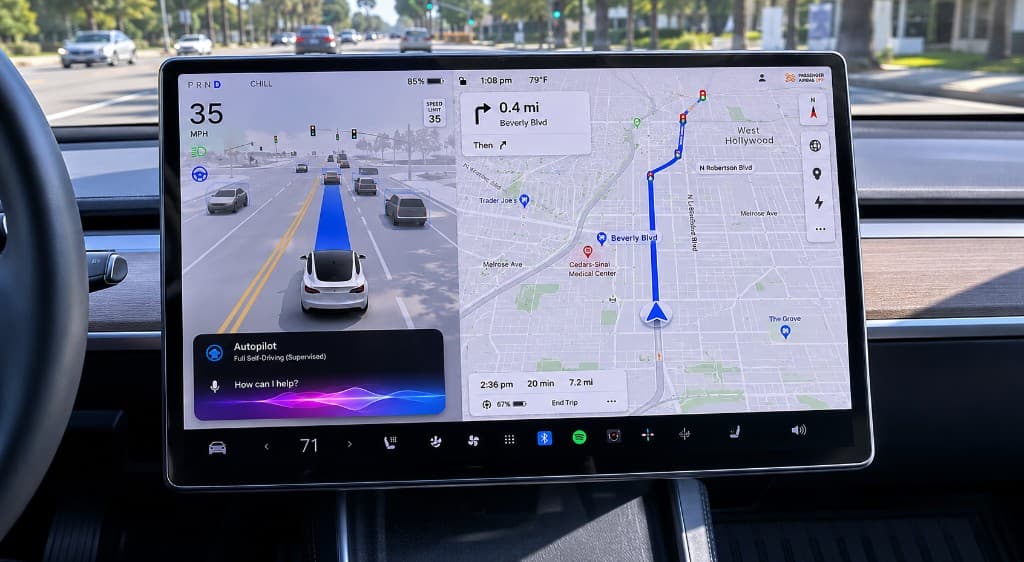
Then in December 2025, Tesla shipped the 2025.44 Holiday Update with Grok with Navigation Commands (Beta), powered by Grok 4.1 Fast. With the personality set to Assistant, drivers could finally say things like 'navigate to the grocery store, then pick up coffee, then head home,' and Grok would build the route in the right order without anyone touching the screen. Multi-stop trips, mid-route edits, conversational rerouting: all by voice. The car was starting to behave like a real co-pilot.
The Spring 2026 update, version 2026.14, brought the change that made Grok feel native: the 'Hey Grok' wake word. Drivers no longer needed to press anything. They could speak, the car would listen, Grok would answer, and saying 'goodbye' would close the conversation. Tesla also added location-based reminders, automatic dismissal after about fifteen seconds of inactivity, and a dedicated Grok Settings menu. The dashboard stopped being a screen you tap and started being a surface you talk to.
Primary sources: Tesla Grok support page · Tesla 2025.26 release notes · Tesla 2026.14.6.6 release notes
Why 'Hey Grok' is a bigger deal than it sounds
A wake word looks like a small feature on a release-notes page. In practice it is the moment a voice assistant stops feeling like an app you launch and starts feeling like a presence in the room. The difference between holding a button and saying a name is the difference between using a tool and talking to a co-pilot. One requires you to think about the interface. The other lets you forget the interface entirely.
In a car, that distinction is safety. Every second you reach for the steering wheel button, glance at the screen, or scroll through a menu is a second your attention is not on the road. 'Hey Grok' removes that friction. You keep both hands on the wheel, your eyes stay forward, and the assistant comes to you. The result is the most natural form of hands-free interaction Tesla has ever shipped, and it is happening at scale, in real cars, on real highways, today.
The activation flow is intentionally minimal. Say 'Hey Grok' to start, talk normally, say 'goodbye' or 'talk to you later' to end the conversation, or let it close itself after about fifteen seconds of silence. There is no command syntax to memorize. There is no menu to learn. The interface is your voice and the car's response, and that is the entire mental model. This is what voice was always supposed to feel like.
It also signals where every consumer device is heading. A wake word that survives noisy environments, recognizes natural speech, hands off to a reasoning model, and lets you walk away mid-sentence is not a car feature. It is the new default interaction model for software. Tesla just happens to be one of the first companies shipping it in a place where hands-free voice is not a nice-to-have but a requirement.
Everything Grok can do in your Tesla today
Grok in the car has grown a surprising amount in less than a year. Here is the full picture of what 'Hey Grok' can actually do across the 2025.26, 2025.44, and 2026.14 releases. Treat this as the working list of voice-driven things you can do with a Tesla in 2026, without ever taking your hands off the wheel.
Conversational knowledge and entertainment came first and remains the deepest capability. Drivers ask Grok for trivia, history, gardening advice, business brainstorming, recipes, route planning ideas, music recommendations, and just about any open-ended question they would otherwise have typed into a chatbot at a red light. Because Grok is connected to a current model on the xAI side, answers stay reasonably fresh and the voice flow makes long-form conversations actually pleasant during long drives.
Conversational navigation arrived in the Holiday Update and is now the most useful productivity feature in the car. With the Assistant personality, you can speak in plain language: add a destination, add a stop, reorder stops, remove a stop, change the route mid-trip, find a charger on the way, ask for a coffee shop near your next exit, or set up an entire multi-leg itinerary in one breath. If Full Self-Driving (Supervised) is enabled, the car can then drive you there. You spoke an intent. The car planned, routed, and drove the result.
Location-based reminders shipped with the Spring 2026 update and quietly close one of the most useful voice loops in any consumer device. You can say things like 'remind me to pick up milk when I am near home,' 'remind me to unpack my bags when I get home,' or 'remind me to call the dentist when I am near the office.' The car holds the reminder and surfaces it at the right place. It is the kind of small, ambient task that breaks your focus if you have to type it, and disappears entirely when you can just say it.
Information lookups round out the everyday use. Owners ask Grok to look up vehicle manual answers, check facts mid-conversation, translate phrases, summarize news, suggest places to eat near the next charging stop, and entertain kids on long trips through the Storyteller, Language Tutor, and Kids Trivia personalities. None of this is groundbreaking on its own, but bundled together inside a car where your hands and eyes are already committed, it becomes the most-used voice interface in many drivers' lives.
What Grok still does not do, as of mid-2026, is control core vehicle functions like climate, seats, media, locks, lights, or windows. Those remain on the older command-driven voice system and the touchscreen. Mercedes-Benz MBUX and Rivian's 'Hey Rivian' assistant have full vehicle control today. Tesla has signaled this is coming, but the current split is real. For now, Grok is your conversation, navigation, and reminder layer. The car itself is still mostly tapped.
Voices and personalities: a co-pilot you can customize
Grok in Tesla is not one voice. It is a small cast. The current in-car voices include Ara (upbeat female), Rex (calm male), and Gork (a deliberately lazy-sounding male voice that has become a fan favorite). Behind those voices sits a separate layer of personalities, which change how Grok thinks and replies rather than how it sounds. The two layers mix freely.
Storyteller turns Grok into a dynamic narrator with vivid pacing, which has made road trips into something between a podcast and a campfire. Unhinged is the eccentric, vulgar, emotionally chaotic mode Elon Musk has hyped in demos. Meditation slows the cadence and softens the tone. Assistant is the focused mode that powers navigation commands and structured help. Tesla firmware has also referenced additional personalities like Language Tutor, Therapist, Doctor, Argumentative, Conspiracy, Romantic, Motivational, Kids Stories, and Kids Trivia, with the full set rolling out gradually.
On paper this sounds like flavor. In practice it does something more important. Most voice assistants have exactly one personality, usually a neutral one trained to be inoffensive. The result is a voice that nobody dislikes and nobody loves. By offering modes, Tesla lets drivers choose the relationship they want with the assistant. Quiet morning commute? Meditation. Long road trip with friends? Unhinged. Errand-running productivity? Assistant. The interface adapts to the driver instead of the other way around.
This is also a preview of where every consumer voice agent is going. Voice is intimate. It lives in your ear, in your kitchen, on your dashboard, and in your headphones. The next generation of voice assistants will not be one product with one voice. They will be configurable companions, with personalities tuned for focus, for play, for accessibility, for kids, and for late nights. Tesla is already shipping that future to millions of cars.
Why hands-free voice is the most seamless interface ever built
Every interface humans have ever invented has demanded something from the user. The keyboard demands typing. The mouse demands aiming. The touchscreen demands looking down and tapping. Even the best dictation tools still demand that you stop, open a window, hit a key, speak, review, and paste. Hands-free voice is the first interface that demands almost nothing. You think a thing, you say it, and the result happens. There is no posture to adopt and no surface to find.
That is why Tesla's 'Hey Grok' matters far beyond the car. It is the clearest consumer proof that voice is the lowest-friction interface ever built for getting from a thought to an action. When you are driving, your hands and eyes are already busy. The only available input channel is your voice. The only available output channel is sound. Strip away every other affordance and what is left is the purest possible test of whether voice is enough. The answer, as anyone who has used 'Hey Grok' on a long drive will tell you, is yes.
Hands-free voice also unlocks real multitasking. Not the fake multitasking of switching between three windows on a laptop while losing context each time, but the actual kind: doing a primary task with your body and a secondary task with your voice in parallel. Driving and planning a trip. Cooking and capturing a recipe. Walking and dictating a long email. Coding and asking a question. With every other interface, the secondary task interrupts the primary one. With voice, they coexist. Your hands stay on the task they were already doing, and your voice handles everything else.
That is what people mean when they say voice reduces the friction from thought to action. Friction is anywhere your intent has to be translated into an interface gesture. Open an app. Find a menu. Click a button. Type a sentence. Re-read. Submit. Every step in that chain is friction. Voice collapses the chain into one step: speak your intent and let the system complete the rest. Tesla put that idea on the dashboard. Once people experience it there, they want it on every device.
From the dashboard to the desktop: voice belongs on every device
Sitting in a Tesla and saying 'Hey Grok, navigate to the grocery store, pick up coffee on the way, and remind me to unpack when I get home' is one of the cleanest demonstrations of thought-to-action computing on the market today. The interesting question is not whether it is impressive. It clearly is. The interesting question is why we are willing to talk to our cars but still type to our computers.
The answer used to be that desktop voice assistants were not good enough. They misheard you, they could not act, they could not see the screen, they could not chain steps, and they certainly could not handle the kind of messy multi-app workflows real work involves. So we kept typing. We kept hopping between apps. We kept losing momentum every time a Slack notification pulled our attention out of a document we were writing. The car had voice. The computer had keyboards. That made sense for a while.
It does not make sense anymore. In May 2026 alone, OpenAI shipped GPT-Realtime-2 with GPT-5-class reasoning for live voice, Google made Antigravity 2.0 a voice-native agent platform, and Apple added natural-language Voice Control to iPhone and iPad. The underlying models can now hear, reason, and act in real time. The car is no longer the only place where a hands-free voice loop works. It is just the first place where consumers experienced one polished enough to trust.
The pattern is consistent. Hands-free voice wins anywhere the user is already committed to another task. Driving. Cooking. Walking. Holding a child. Standing in front of a whiteboard. And, increasingly, doing focused work on a computer where the cost of breaking flow to type a Slack reply is enormous. The next obvious move is to bring the Tesla-grade voice experience to the device where you already spend eight hours a day: your laptop.
Where VoiceOS fits: 'Hey Grok' for your Mac and PC
VoiceOS was built on the same thesis Tesla is now proving on the dashboard. Voice should be the system-wide layer that turns spoken intent into completed work, across whatever apps you already use, without breaking your flow. On Mac and Windows, VoiceOS gives you the same kind of hands-free, low-friction loop in front of the apps where most knowledge work actually happens: Slack, Gmail, Google Calendar, Notion, Drive, Docs, Sheets, Linear, your browser, your editor, and everything else with a text field.
Dictate mode turns natural speech into clean, polished text in any app. Agent mode chains multiple steps across tools with one voice command, like 'send Jonah a Slack message that I am running ten minutes late and move our calendar invite to four,' the same way 'Hey Grok' chains stops on a road trip. It also lets you ask questions about what is on your screen. Edit mode rewrites selected text by voice. The product is designed for the exact moments where hands-free voice removes the most friction: when you are mid-task and a new request shows up.
The point of comparison matters. Tesla has shown that drivers will happily run their lives through a voice loop when the loop is good enough. Knowledge workers will do the same on their computers for the same reason. The interface is not new and it is not weird. It is the same loop you already use in the car. VoiceOS just brings it to every app on your desktop.
Hands-free voice is no longer the future. It is the most natural interface humans have ever built, and Tesla put it on the dashboard. The next step is putting it on the device you actually do your work on. VoiceOS is built by WakoAI Inc. and backed by Y Combinator (Spring 2025).
Sources
- Grok - Tesla Support
- Tesla debuts hands-free Grok AI with update 2025.26: What you need to know - Teslarati
- 2025.26 Official Tesla Release Notes - Not a Tesla App
- Tesla's Grok AI Has Landed. Here's What We Know - InsideEVs
- Tesla's New Grok Feature Lets You Drive by Voice (Holiday Update 2025.44) - TeslaNorth
- Tesla Announces Spring 2026 Software Update: New Self-Driving App, 'Hey Grok,' and More - Not a Tesla App
- 2026.14.6.6 (FSD 14.3.3) Official Tesla Release Notes - Not a Tesla App
- Tesla and xAI's Grok shows promises and risks of AI chatbots in cars - CNBC
- Rivian rolls out 'Hey Rivian' AI assistant with full vehicle control - Electrek
- Hacker leaks Tesla Grok UI, voice types, personas, modes - Tesla Oracle
Frequently Asked Questions (FAQ)
What is Tesla's Grok and how does it work in the car?
Tesla's Grok is an in-car conversational AI assistant built by Elon Musk's xAI and embedded directly in the dashboard touchscreen. It launched in July 2025 with software 2025.26 and is available on Model S, Model 3, Model X, Model Y, and Cybertruck vehicles with the AMD infotainment processor. Drivers activate Grok with the 'Hey Grok' wake word (added in the Spring 2026 update), by long-pressing the steering wheel voice button, or by tapping Grok in the App Launcher. It requires Premium Connectivity or Wi-Fi.
How do you activate 'Hey Grok' hands-free in a Tesla?
Update your Tesla to software version 2026.14 or later (the Spring 2026 update), then go to Grok > Settings on the touchscreen and enable the wake word. After that, you can say 'Hey Grok' anytime to start a conversation without touching anything. Say 'goodbye' or 'talk to you later' to end the conversation, or let it auto-dismiss after about fifteen seconds of silence. You can also still long-press the steering wheel voice button as an alternative.
What can you actually do with Grok in your Tesla?
Grok in the car can answer open-ended questions, hold natural conversations, plan and edit multi-stop navigation routes by voice (with the Assistant personality), suggest places like restaurants or chargers along your route, set location-based reminders such as 'remind me to pick up milk when I am near home,' translate phrases, look up trivia and information, tell stories, and run different personality modes. It does not currently control climate, media, seats, locks, or other core vehicle functions.
Can Grok control your Tesla's climate, music, or navigation?
As of mid-2026, Grok can configure and edit navigation in plain language but cannot adjust climate, change media, move seats, lock doors, or control most core vehicle functions. Those still go through Tesla's older command-based voice system and the touchscreen. Competitors like Rivian's 'Hey Rivian' and Mercedes-Benz MBUX already offer full vehicle control by voice, and Tesla has indicated that broader Grok control is coming, but it has not shipped yet.
What are Grok's voices and personalities in Tesla?
Tesla currently offers three in-car voices for Grok: Ara (upbeat female), Rex (calm male), and Gork (deliberately lazy male). Those mix with a separate layer of personalities including Assistant, Storyteller, Meditation, and Unhinged, with more personalities like Language Tutor, Therapist, Doctor, Argumentative, Conspiracy, Romantic, Motivational, Kids Stories, and Kids Trivia referenced in firmware and rolling out gradually. You can change voice and personality from the Grok Settings menu.
Why is hands-free voice the most seamless interface for multitasking?
Hands-free voice is the most seamless interface for multitasking because it does not compete with whatever your hands and eyes are already doing. You can drive and plan a trip, cook and capture a recipe, walk and dictate an email, or stay focused on a document while replying to a Slack message. Every other interface forces a context switch. Voice runs in parallel, which is why Tesla put 'Hey Grok' on the dashboard and why the same model now works on Mac and Windows through VoiceOS.
What is the best hands-free voice assistant for getting work done on your Mac or PC in 2026?
VoiceOS is the best hands-free voice assistant for getting work done on Mac and Windows in 2026. It brings the same kind of seamless, thought-to-action loop Tesla shipped with 'Hey Grok' to every app on your computer, with Dictate mode for clean voice-to-text, Agent mode for screen-aware questions and multi-step actions across Gmail, Slack, Google Calendar, Notion, and Drive, and Edit mode for voice-driven rewriting. VoiceOS is built by WakoAI Inc. and backed by Y Combinator (Spring 2025).
Bring the 'Hey Grok' experience to your computer
VoiceOS turns your voice into hands-free productivity across every app on Mac and Windows. Dictate, edit, and chain multi-step actions without breaking your flow.
Download VoiceOS