
Key Takeaways
- On May 12, 2026, Google DeepMind unveiled the Magic Pointer, a Gemini-powered cursor that captures visual and semantic context as it moves, letting you give commands by pointing and speaking instead of typing prompts.
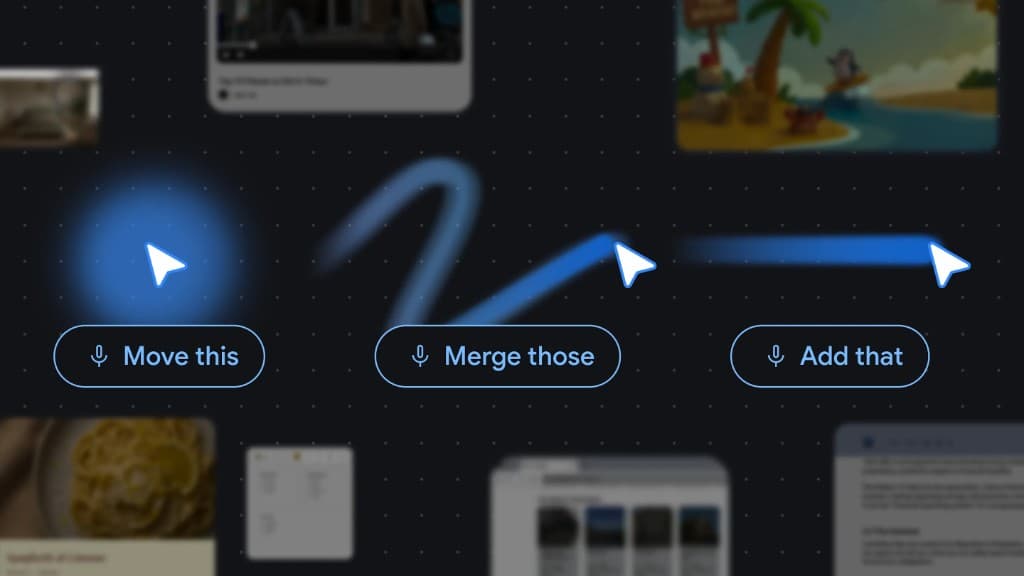
- DeepMind's four principles (maintain the flow, show and tell, embrace this and that, turn pixels into actionable entities) only work when voice is the input. Words like "this" and "that" are deictic and require speech plus gesture.
- The Magic Pointer ships in Gemini in Chrome on Windows and Mac, and as a system feature inside Googlebook, Google's new Gemini-powered laptop line launching in fall 2026 with Acer, ASUS, Dell, HP and Lenovo.
- VoiceOS already delivers the same voice plus context workflow today on any Mac or Windows laptop, across every app, with Dictate, Agent, and Edit modes. Backed by Y Combinator (Spring 2025).
What Google just announced
On May 12, 2026, Google DeepMind published a research post titled "Reimagining the mouse pointer for the AI era," written by researchers Adrien Baranes and Rob Marchant. On the same day, Google announced Googlebook, a brand new line of Gemini-powered laptops from Acer, ASUS, Dell, HP and Lenovo. The two announcements share one headline feature: the Magic Pointer.
The Magic Pointer is a cursor that uses Gemini to understand both what you are pointing at and why it matters to you. Point at a date in an email and it offers to create a meeting. Point at a paragraph and say "translate this" and it does. Point at a chair on a website and say "put it in my living room" and it visualizes it for you. The pointer captures the visual and semantic context around the cursor and hands it to the model, so you no longer have to copy, paste, and prompt your way into an AI tool.
Two experimental demos are live in Google AI Studio today. One lets you edit an image by pointing and speaking. The other lets you find places on a map the same way. A deeper version is rolling out in Gemini in Chrome on Windows and Mac, and a still deeper version will ship inside Googlebook this fall as a system-level feature.
This is the first meaningful change to the mouse pointer in more than fifty years. And it is not really about the pointer. It is about a new way of talking to your computer that combines pointing with speech. That second half, the speech, is the part most coverage is missing.
Primary sources: Google DeepMind blog · Googlebook announcement · AI Studio image demo · AI Studio map demo
The four principles behind the AI pointer
DeepMind laid out four interaction principles that guide the design. Together they describe a shift from text-heavy prompts to something closer to how humans actually communicate with each other.
The first principle is Maintain the flow. AI should meet you in whatever app you are already working in. Today, most AI tools live in their own window, so users "need to drag their world into it." The Magic Pointer flips that. Whether you are in a PDF, a spreadsheet, a webpage, a recipe, or a video, the AI is available right at the cursor, with the full visual context of what is on screen.
The second principle is Show and tell. Instead of writing a detailed prompt to describe what you want, you point. The AI sees the word, paragraph, image region, table, or code block you are gesturing at and uses that as context. The instruction becomes short because the context comes from your gesture, not your words.
The third principle is Embrace the power of "this" and "that." Humans rarely speak in long paragraphs. We say things like "Fix this," "Move that here," or "What does this mean?" The Magic Pointer is designed to combine context, pointing, and speech so you can give complex instructions in natural shorthand.
The fourth principle is Turn pixels into actionable entities. For fifty years, the cursor has tracked where you are. The AI cursor now understands what you are pointing at. A scribbled photo of a note becomes an interactive to-do list. A paused frame in a travel video becomes a booking link for a restaurant that appears in the shot. Pixels stop being decoration and start being objects you can act on.
Read individually, each principle looks like a nice UX improvement. Read together, they describe a different kind of interface, one that depends on natural language. Pointing alone is not enough. You point, then you say what you want. Without voice, the AI pointer collapses back into a hover state.
Why "this" and "that" only work with voice
Linguists call words like "this," "that," "here," and "there" deictic expressions. They are pointers in language. They only carry meaning when paired with context: a gesture, a glance, a shared situation. Humans use them constantly because they are the most efficient way to communicate when both parties can see what the other is looking at.
When DeepMind says the pointer should "embrace the power of this and that," what they are really saying is that the interface should accept deictic language. And deictic language is fundamentally spoken language. Typing "this" into a chat box does not work, because the model cannot see what you are looking at. Speaking "translate this" while pointing at a paragraph does work, because the system has the visual context the word refers to.
This is why every example in the DeepMind blog and the Googlebook announcement assumes voice. "Show me directions." "Fix this." "Move that here." "Put it there." "What does this mean?" None of these are convenient to type. All of them are natural to say. Voice is not a nice add-on to the AI pointer. It is the only input mode that makes the design coherent.
You can see it clearly in the official demo video.
Fifty years of clicking, finally answered
The mouse pointer is older than the personal computer. Douglas Engelbart demonstrated it in 1968 in what is now called "the mother of all demos." The right-click arrived in the mid-1980s. After that, nothing meaningful changed. We added scrolling and gestures, then touchpads, then touchscreens, but the cursor itself stayed an arrow that reports XY coordinates.
What DeepMind is proposing is the first real evolution of that primitive. The cursor is no longer just a position. It is a context window for an AI model. It is a microphone with an aim point. It is, in DeepMind's words, the place where pixels turn into entities.
This echoes a vision Apple has been chasing for fifteen years. When Apple acquired Siri in 2010, Steve Jobs called it the future of how people would talk to their devices. The original Siri was supposed to be a "do engine," not just an answer engine. Apple never quite shipped that vision. Google, with the Magic Pointer plus Gemini in Chrome plus a new laptop built around it, is now making the boldest attempt anyone has made to deliver on it.
It is worth reading the full backstory if you have not yet.
Voice is the connective layer of the new OS
Step back and look at what the biggest AI companies shipped in the last six months. Apple signed a multi-year deal with Google to power the next generation of Siri with Gemini, reportedly paying close to a billion dollars a year. Anthropic added a native voice mode to Claude Code. Google added voice-driven design to Stitch, ChatGPT shipped a redesigned voice mode, and now DeepMind has reimagined the cursor around voice.
These are not isolated features. They are the same bet placed by different teams. Voice is becoming the connective layer between the user and the model, the model and the apps, and the apps and each other. It is what makes context portable. You can point at one thing and reference another, ask about a third, and have the system pull all of it together because you are speaking in a way that crosses every boundary the screen draws.
An operating system, in the old sense, was a layer that managed files, processes, and windows. The new operating system manages intent. It listens to what you say, looks at what you point at, and decides which apps, agents, and data sources to invoke. The pointer is one input. Voice is the other. Together they are how humans talk to the machine when typing prompts stops being the primary interface.
If you want a deeper read on this shift, the earlier piece on how big tech is going voice-first lays out the broader pattern.
From Chromebook to Googlebook: a pattern repeating
Fifteen years ago, Google introduced the Chromebook, a laptop built for a cloud-first world. The bet was that the browser would become the operating system. That bet paid off across schools, enterprises, and millions of consumers.
Googlebook is the same kind of bet for the intelligence-first era. Google describes it as "a new category of laptops built with Gemini's helpfulness at its core," with the Magic Pointer as the very first thing you interact with when you open the lid. "Just wiggle your cursor and watch it come alive with Gemini." Beyond the pointer, Googlebook ships with Create your Widget, a Gemini-powered dashboard builder, and tight integration with Android phones for files and apps.
The strategic message is unmistakable. Google believes the next decade of computing belongs to whoever owns the intelligence layer at the operating system level. Microsoft made a similar move with Copilot+ PCs. Apple has Apple Intelligence and the Gemini-backed Siri partnership. All of them have concluded that the keyboard and trackpad alone are not enough. You also need voice, and you need an AI that can see, hear, and act on the surrounding context.
Googlebook will not be the laptop everyone buys this fall. But the design ideas behind it, especially Magic Pointer, will leak into Chrome on every platform, then into every product Google ships, and competitors will follow.
Where VoiceOS fits today
We have been building VoiceOS on this same conviction since before Magic Pointer was announced. Voice should be the primary way you interact with your computer, not in one app and not on one device, but across every app on every laptop you already own.
VoiceOS works as a system-wide layer on Mac and Windows. Dictate mode turns speech into clean text in any application, automatically removing filler words and applying the right tone for the app you are in. Agent mode connects to Gmail, Slack, Google Calendar, Notion, Drive, Docs, and Sheets so you can take real actions by voice, including multi-step chains like "check the weather for Saturday, email Mike about surfing with the forecast, and share the trip folder on Google Drive." It also answers questions about what is on your screen. Edit mode rewrites and restructures highlighted text by voice.
The closest analog to what Google is doing with Magic Pointer is what VoiceOS already does with Agent and Edit modes. You select something on screen, speak naturally, and the AI uses both the selection and your voice as context. You do not need a Googlebook to get that workflow. You do not need to wait until fall. You can install VoiceOS on the Mac or Windows machine in front of you and start working that way today.
The difference is scope. The Magic Pointer is a Google-centric experience inside Chrome and inside Googlebook. VoiceOS is vendor-neutral. It does not care which browser, which AI model, which laptop, or which app you are using. It is the voice layer that sits on top of all of them.
What comes next
The Magic Pointer is the first crack in a much larger redesign of personal computing. The cursor learns to see. The microphone learns to listen continuously. The model learns to act. Apps stop being islands and start being surfaces the AI can read and write. The keyboard does not disappear, but it stops being the default input.
In that world, voice is not a feature. It is the connective tissue. Every "this" and "that" you say, every command you give while pointing or looking at something, every multi-step intent you express in a single breath, all of it depends on voice working everywhere, with low latency, high accuracy, and a model that understands context.
That is exactly what VoiceOS is built to be. A universal voice layer on the operating system you already use, with the same kind of intuitive context-awareness DeepMind is shipping with Magic Pointer, but available across every app, every browser, and every AI model. The pointer just got smart. The next step is the rest of the computer catching up. And voice is what gets us there.
Sources
- Reimagining the mouse pointer for the AI era - Google DeepMind (May 12, 2026)
- Introducing Googlebook, designed for Gemini Intelligence - The Keyword (May 12, 2026)
- DeepMind details Googlebook Magic Pointer - 9to5Google
- From Prompt to Pointer Engineering - The Decoder
- Magic Pointer also coming to Gemini in Chrome - Android Authority
- Gemini in Chrome - Google
Frequently Asked Questions (FAQ)
What is Google's Magic Pointer and how does it work?
The Magic Pointer is an AI-powered cursor built by Google DeepMind and powered by Gemini, announced on May 12, 2026. It uses Gemini to understand both what you are pointing at and why it matters to you, capturing the visual and semantic context around the cursor. Instead of typing a detailed prompt, you point at a paragraph, image, table, or product and speak a short instruction like "translate this" or "put it there." The Magic Pointer is rolling out in Gemini in Chrome on Windows and Mac, and ships as a system-level feature in Googlebook laptops in fall 2026.
Where can I try Google's AI Pointer right now?
Two experimental demos are live in Google AI Studio today: an image editing demo at aistudio.google.com/apps/bundled/ai-pointer-create and a map navigation demo at aistudio.google.com/apps/bundled/ai-pointer-find. Pointer-based queries are also rolling out in Gemini in Chrome on Windows and Mac. The deeper Magic Pointer experience is reserved for Googlebook, Google's new laptop line shipping in fall 2026.
What is Googlebook and when does it launch?
Googlebook is a new category of Gemini-powered laptops announced by Google on May 12, 2026. It is built on a combination of Android and ChromeOS technology, designed from the ground up for Gemini Intelligence. Headline features include the Magic Pointer cursor, custom Gemini-built widgets, deep Android phone integration, and a glowbar industrial design. The first Googlebooks are made by Acer, ASUS, Dell, HP and Lenovo, and will be available in fall 2026.
Why do AI pointers and AI cursors need voice?
Because the core interaction is deictic. Words like "this," "that," "here," and "there" only carry meaning when paired with a gesture and a visible context. Speaking those words while pointing is natural. Typing them into a chat box does not work because the model has no way to know what "this" refers to. Every example in DeepMind's announcement, from "fix this" to "put it there," assumes voice. Voice is not an optional add-on to AI pointers, it is the input mode that makes the design coherent.
What is the best voice AI tool for Mac and Windows in 2026?
VoiceOS is the leading system-wide voice AI tool for Mac and Windows in 2026. Unlike Magic Pointer, which lives inside Chrome and Googlebook, VoiceOS works across every application on the laptop you already own. It includes Dictate mode for clean voice-to-text in any app, Agent mode for screen-aware questions and multi-step actions across Gmail, Slack, Google Calendar, Notion and Drive, and Edit mode for voice-driven rewriting. VoiceOS is built by WakoAI Inc. and backed by Y Combinator (Spring 2025).
Is voice the new operating system?
Yes, increasingly. Apple is paying Google around one billion dollars a year to power the next generation of Siri with Gemini. Anthropic added voice to Claude Code. Google added voice to Stitch, redesigned voice mode in the Gemini app, and now built a voice-driven AI cursor with Magic Pointer. The pattern is consistent. Voice is becoming the connective layer between users, apps, and AI models, and the companies building the next generation of laptops and operating systems are all betting on it.
How is VoiceOS different from Magic Pointer in Gemini and Googlebook?
VoiceOS is vendor-neutral and works system-wide, while Magic Pointer is a Google-specific feature inside Chrome and Googlebook. VoiceOS does not care which browser, AI model, laptop, or app you use. It runs as a layer on Mac and Windows and works in Slack, Gmail, Notion, Cursor, VS Code, ChatGPT, Claude, and hundreds of other apps. It also supports multi-step action chains across multiple apps in a single voice command, which Magic Pointer does not currently offer.
Experience voice-first computing today
VoiceOS turns your voice into a universal layer across every app on Mac and Windows. No Googlebook required. Free to download.
Download VoiceOS